
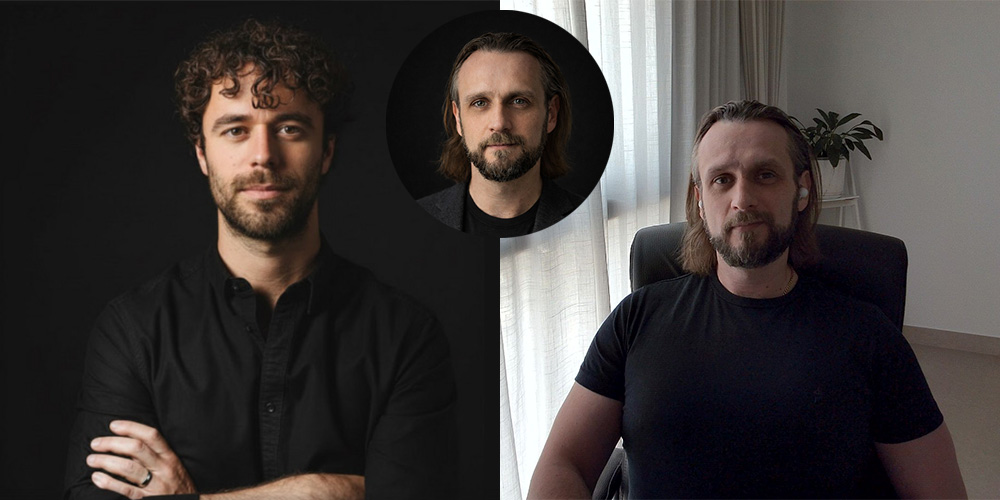
This one has a shout out to Ruben Hassid (pictured top left) where I came across this post about creating his profile image using AI, specifically Gemini and Nano-Banana Pro.
I needed a profile picture refresh, so I decided to test the process myself. To make it more interesting, I used ChatGPT to create a LinkedIn profile picture. It may not be the most advanced image tool, but it is what most casual users reach for first, so it felt like a realistic starting point. I have also been taking a more transparent approach to how I work and what I am learning, so it made sense to start with something simple and practical.
From experience, multi-step workflows in ChatGPT tend to work best when you break them into clear stages and guide the model step by step. So this is what I prompted:
I’m going to upload 2 images and a prompt. – 1st image is the refence – 2nd image will be me – prompt what I want you to do.
Ask me for each of these 3 parts so I know you understand.
Why Get Chat GPT to prompt me back
Ultimately I find it works much better than giving it all the information in one go however – let’s ask the LLM its self… so Chat GPT – it is best to break a multi-step prompt into clearly defined stages
When working with large language models such as ChatGPT, multi-step tasks generally perform better when decomposed into structured stages. There are several reasons for this:
- Reduced cognitive load within a single prompt: Although models can handle complex instructions, combining too many objectives into one prompt increases ambiguity. Ambiguity increases variance in output quality.
- Clearer objective alignment: Breaking a task into stages forces you to define the output criteria for each step. This reduces drift and improves controllability.
- Iterative correction: A staged workflow allows you to validate and refine intermediate outputs before proceeding. This minimises error propagation across the chain.
- Better constraint handling: When constraints, tone, formatting, and technical requirements are layered gradually, the model is more likely to adhere to them consistently.

Rubens Prompt: A professional, high-resolution, profile photo, maintaining the exact facial structure, identity, and key features of the person in the second image. The subject is framed from the chest up, with ample headroom and negative space above their head, ensuring the top of their head is not cropped. The person looks directly at the camera, and the subject’s body is also directly facing the camera. They are styled for a professional photo studio shoot, wearing a smart casual blazer. The background is a solid ‘# 141414’ neutral studio. Shot from a high angle with bright and airy soft, diffused studio lighting, gently illuminating the face and creating a subtle catchlight in the eyes, conveying a sense of clarity. Captured on an 85mm f/1.8 lens with a shallow depth of field, exquisite focus on the eyes, and beautiful, soft bokeh. Observe crisp detail on the fabric texture of the blazer, individual strands of hair, and natural, realistic skin texture. The atmosphere exudes confidence, professionalism, and approachability. Clean and bright cinematic color grading with subtle warmth and balanced tones, ensuring a polished and contemporary feel.
That wraps up my experiment in using Chat GPT to create a LinkedIn profile picture. It may not quite replace the real thing, but it certainly passes the LinkedIn test.😁
You can of course see the output image as part of this post or visit my LinkedIn Profile if you want to connect.